How to Find an AION 2 Rift Portal
Use the current in-game rift marker to find entry. A countdown tells you when a reference opening is expected; it cannot identify the active portal on your server.
Wait for the opening announcement
The official Taiwan guide describes a system message when an ordinary portal opens. Compare the in-game next start before you travel. If the event has not started, arriving at a historical portal point will not make the marker appear. Once you see the announcement, move to the current map rather than continuing to follow a route copied from an older opening.
Read the current map marker
Open the world map, inspect the relevant region and look for the active rift marker. If you have hidden activity markers, restore the map view and inspect it again. Check the activity name so that you do not confuse an ordinary crossing with Rift Contest. This guide explains how to locate the active point; it does not claim a fixed coordinate that is always open.
Build your travel route from that point
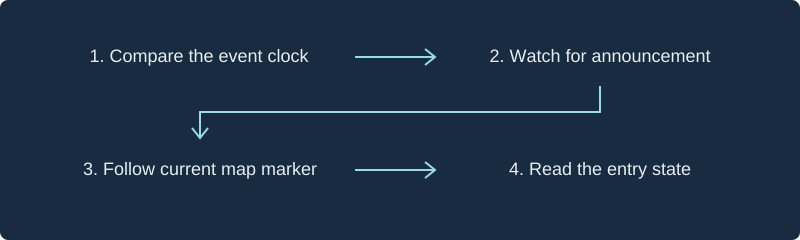
Choose a travel destination you can actually access, then inspect the remaining route to the marker. Compare travel time with the game’s remaining entry time before committing. When playing with friends, share the current marker and a regrouping point, not only a region name. If the marker differs from a saved screenshot, use the live marker. The accompanying diagram is a navigation workflow, not a geographic map.
Confirm entry before moving to your objective
At the portal, inspect the current entry state and any message returned when you interact. A map icon is evidence of a location, not a guarantee of capacity. After crossing, confirm the destination and the mission you intend to complete. If no marker appears after an announcement, use the troubleshooting guide to separate map visibility, timing and service interruptions.
Frequently asked questions
Is there one permanent portal coordinate?
This site has not verified an always-active coordinate. The official guide directs players to the location shown on the map after an opening.
Does this page contain a world map?
No. It provides the announcement-to-marker workflow. The diagram illustrates those steps and is not game geography.
Sources and scope
NC Taiwan official Spacetime Rift guide
Guide updated September 17, 2026; read October 7, 2026. Taiwan service only. English activity names are descriptive translations.
Related guides
Rift Troubleshooting: Missing or Full →
Diagnose a missing rift, closed portal, full instance or clock mismatch with a symptom checklist and worked time-zone examples.
Field guideRift Schedule & Time Zones →
Read the three-hour rift reference cycle, compare Korea and Taiwan time zones, and calibrate a custom server clock.